
A lyric video can hit every cue and still be unreadable when the words won’t sit still. Today’s tools nail word-level sync, but the real test is how much of your track they let you see. We compared six platforms on one metric: how deeply they listen to your song’s stems, beats and breaths. Scan the table below, or keep reading for the full breakdown of winners and trade-offs.
The Best AI Lyric Video Makers for Kinetic Typography at a Glance
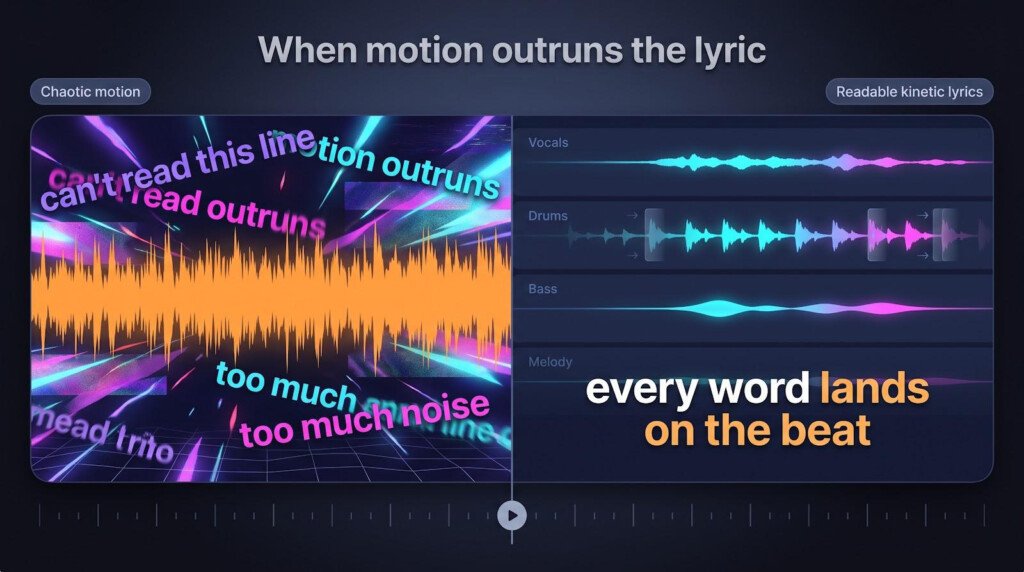
Scanning for the shortcut? This table is it. Pay close attention to what the motion layer knows: as you move down the list, musical awareness drops and the risk of unreadable lyrics rises.
| Tool | What the motion layer knows | Kinetic typography control | Max resolution | Best for |
| Neural Frames | Eight-stem separation: drums, bass, vocals, melody and others | Scene-by-scene choice of which stem drives motion; adjustable word timing | 4K upscaling on higher plans | Stem-level motion without losing legibility |
| TwoShot | Vocals, drums, bass and instrument stems, plus phoneme-level word timing | Preset animations or a style described in plain text | Native 4K | Precise lyric sync with stem isolation |
| Videobolt | Pre-authored template motion; the song informs timing, not dynamics | Swap fonts, colours and word density per template | Up to 4K at 60fps on Pro | Fast, polished template output |
| Solmi | Vocal-stem loudness, with karaoke presets | Basic font and colour tweaks; line-break editor | 1080p | Quick karaoke or TikTok clips |
| Youka | Vocal stem plus word-by-word timestamps in 50+ languages | Change backgrounds, fonts and highlight colour | 1080p | Multilingual karaoke accuracy |
| Sonexa | Beat grid and loudness of the full mix | Choose from beat-reactive presets | 1440p | Rapid social teasers |
How We Ranked These Tools
We scored each platform on one question: how much of the song’s detail reaches the text you read on screen.
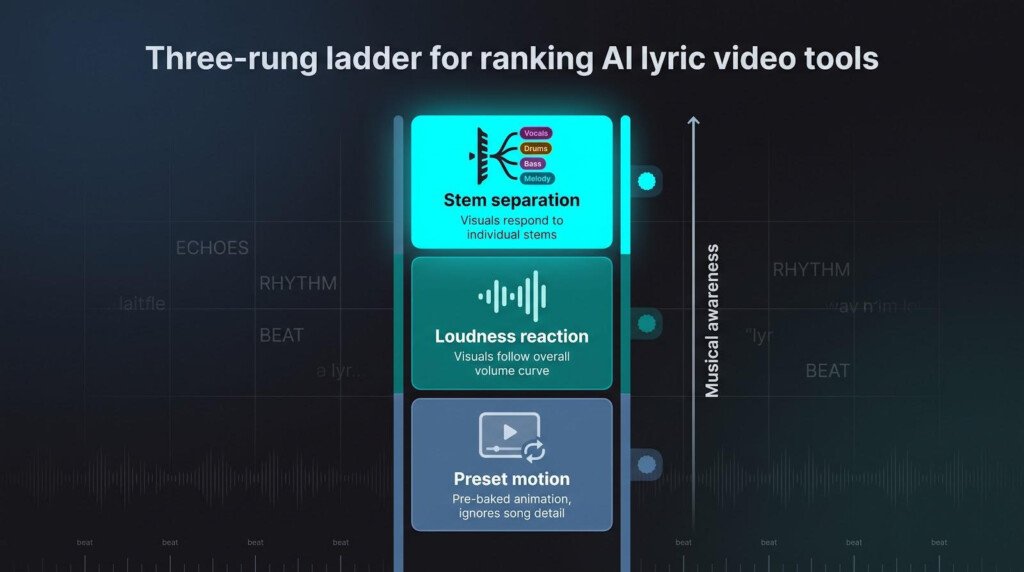
To grade that, we built a three-rung ladder of musical awareness:
- Preset motion. Animation is authored before your track loads, so a dense rap verse and a quiet ballad share the same motion budget.
- Loudness reaction. Visuals rise and fall with the amplitude curve, adding energy but often peaking exactly when the lyrics are busiest.
- Stem separation. The mix is split into individual parts, so you can tie visuals to a kick or bass line while the vocal-linked lyric layer stays still and readable.
This is a framework applied to published capabilities, public demos and August 2026 pricing — not a stopwatch test. We did not render the same song through all six platforms. Where a vendor does not publish a figure, we say so rather than guess.
1. Neural Frames: Best for Stem-Level Control Over What Moves
Branded as an AI lyric video maker that turns words into art, this online lyric video generator handles the heavy lifting.

Neural Frames lyric video editor with eight-stem motion control.
How It Works
Upload your finished track and Neural Frames splits it into eight stems — drums, bass, vocals, melody and others. Each stem draws its own motion curve, so a snare roll can jolt the background while the lyric layer stays anchored to the vocal. That separation keeps visuals intentional instead of frantic.
The interface feels more like a DAW than a template app. Drop a chorus marker, let the kick push the camera, and pin lyric opacity to the vocal envelope. Three creation modes fit any workflow: Autopilot for speed, text-to-video for prompt-driven scenes, and frame-by-frame when a hero shot has to land on one word.
Already have a track from Suno or Udio? Drop it straight in. Neither one builds the music video for you, so the audio still needs visuals — and Neural Frames turns audio into motion rather than composing anything itself.
Why It Ranks First
No other tool here listens this deeply. Eight separate stems give you a fader for every major part of the mix: bump the camera on the kick, freeze the lyric during a held vocal, or let hi-hats sparkle behind dense rap. That stem intelligence is what protects the viewer’s reading window, because motion can be driven by something other than the voice singing the words.
Export quality supports it. The Ninja tier at $66 per month (August 2026) unlocks 4K upscaling, which keeps text crisp after YouTube compression.
Where It Falls Short
- There is no free tier. Every plan is paid, and rendering consumes credits, so re-renders cost again.
- 4K upscaling requires the Ninja tier at $66 per month; the Knight plan at $26 tops out at 1080p (August 2026).
- The learning curve is real. Stem routing and prompt-driven scene changes take an afternoon to get comfortable with. If you want one-click output, TwoShot or Videobolt will be faster.
- It will not write your song. Composition happens elsewhere.
2. TwoShot: Best for Precise Word Timing Plus Stem Isolation
TwoShot AI lyric video timeline with phoneme-level word timing.
How It Works
TwoShot begins with phoneme-level transcription. The AI stamps every word against the waveform and identifies verse, chorus and bridge automatically, so syllables in a double-time verse land where your ears expect them. Once the text is locked you choose a built-in style — word-by-word fade, slide from the bottom, bounce on the beat, karaoke highlight or typewriter — or describe an effect in plain language and let the engine build it.
That creative layer sits on a four-stem split: vocals, drums, bass and instruments. Mute a stem’s influence, or let the kick drive background flashes while the lyric layer follows the vocal alone. Exports come in 16:9, 9:16 and 1:1.
What It Does Well
Timing accuracy removes nearly all manual nudging, so you spend your time styling rather than fixing sync. The four-stem model dodges the loudness trap: drums can shake the camera while text stays legible on the vocal.
It is also the most generous on access. TwoShot does not watermark output on any tier, including the free one, which carries 250 credits a month. Paid plans start at $9.50 per month, credit packs start at $15, and native 4K output is available (August 2026).
Where It Falls Short
- It is not a one-click factory. Designing each section takes longer than dropping a Videobolt template.
- The four-stem cap is shallower than Neural Frames’ eight, so busy mixes can still push motion and lyric into the same moment.
- TwoShot sits inside a broader creative suite, so if you only want lyric timing, tools you will never touch crowd the interface.
3. Videobolt: Best for Template-Led Kinetic Typography
Videobolt lyric video template gallery and fast editor interface.
How It Works
Videobolt trades deep audio analysis for raw speed. Pick a template from a library of more than 17,000 motion-graphics designs, upload your track, and the system stretches the timing grid to fit. Every letter, camera move and particle burst is pre-authored, so chorus and bridge share one choreography. You lose stem nuance and gain a finished lyric cut in minutes.
The editor stays intentionally light: choose a palette, swap fonts, drag a slider for words per beat, then render. Polished 3D text, reflections and lens flares appear even if you have never touched a keyframe.
What It Does Well
Speed is the star, and the production value is baked in. Sliders for word density and line spacing keep the interface breezy, and batch work turns a remix EP into a matching set of clips quickly.
Pricing is straightforward subscription rather than per-render billing. As of August 2026, plans run Lite at €9.99, Pro at €24.99 and Business at €39.99 per month billed annually, and the Pro tier covers unlimited watermark-free renders at up to 4K and 60fps, for videos up to an hour.
Where It Falls Short
- Motion spends the reading window at a flat rate. A whispery verse and a high-energy chorus fly past in the same interval, so dense lyrics feel crammed and long sustains leave the screen empty.
- There is no stem awareness. The engine reads beat grid and section length, so a drum fill can jolt the background exactly when a tongue-twister line needs calm.
- Template choreography is fixed. If a song needs section-by-section nuance, you are adjusting one global slider rather than individual parts.
4. Solmi: Best for Quick Karaoke and Social Formats
How It Works
Solmi keeps things brief. Drop in an MP3 and the browser detects the lyrics, sweeps a karaoke highlight across each line, and formats the canvas for vertical, square or horizontal output. Pick a preset — TikTok bounce, Instagram pan, classic karaoke bar — and each line syncs to the vocal.
Everything lives on one page. A timeline of colour blocks shows every line; drag to extend, click to split, press Space to preview. When the highlight tracks correctly, render at 1080p.
What It Does Well
Solmi nails karaoke basics. The highlight bar glides across syllables, so sing-along clips stay readable even muted, and vertical-first templates land on TikTok and Reels without recutting.
There is a genuine free plan with a monthly credit allowance. Paid tiers run Plus at $35, Creator at $85 and Pro at $135 per month (August 2026).
Where It Falls Short
- Motion follows loudness only, so a big snare hit and a vocal peak share the same spike. Dense choruses can jitter exactly when viewers need calm.
- Resolution tops out at 1080p, which looks soft beside a 4K main video.
- Independent evidence for its sync accuracy is thin, so treat the marketing claims as claims until you test your own track.
5. Youka: Best for Word-by-Word Timing Across Languages
How It Works
Youka runs entirely in the browser. Paste a YouTube link or upload an MP3 and the engine separates the vocal, detects the language, and writes a lyric file with word-level timestamps. More than 50 languages are supported, so Spanish rap, K-pop hooks and Afro-beat chants all sync without phonetic workarounds. Choose a background, pick a font, and render a 1080p MP4 in roughly two minutes.
Motion stays minimal: a karaoke sweep highlights each word as the syllable lands. No shakes, no cuts, just clarity.
What It Does Well
Accuracy across languages is the specialty. Word-level sync works in Japanese, Portuguese or Swahili as reliably as in English, which matters for multilingual releases. Because visuals are restricted to a single sweep, nothing competes with the words — useful for lyric-breakdown channels and classrooms. Backgrounds, fonts and highlight colours are all adjustable.
Where It Falls Short
- It is karaoke-centric. There are no camera moves, particles or scene changes.
- Resolution tops out at 1080p, so text looks soft next to a 4K music video.
- There is no stem-driven motion, so instrumental bridges leave the screen static for bars at a time.
6. Sonexa: Best for Fast Beat-Reactive Social Clips
How It Works
Drop in a track and Sonexa detects the beat, then applies preset kinetic typography and highlighting so lyrics pop with the rhythm. Controls stay minimal: a style picker flips between looks, and exports top out at 1440p.
What It Does Well
Beat-aligned presets produce social-ready clips quickly, which is the entire point. If you need a teaser before release day, this is the shortest path from upload to post.
Where It Falls Short
- The beat grid reads volume, not stems, so a distorted guitar landing on the downbeat can still blur the word underneath it.
- Export caps at 1440p with no 4K option, which is fine on phones and soft on desktop.
- Preset styles run loud, and there are no keyframes to tone them down.
- Its accuracy claims carry limited independent proof. Sonexa does not publish full pricing on its comparison pages, so check current terms before committing.
Where Adobe After Effects Still Wins
After Effects is the control room the AI tools keep trying to imitate. Open a comp and every pixel, easing curve and camera path answers to you alone. Need a lyric line to arc behind a character, blur, then resolve into a neon logo on a reverse-reverb swell? There is no preset for that. You keyframe it, mask it, and polish it.
That granularity is priceless when a track calls for bespoke typography — layered metaphors, call-and-response verses, bilingual stanzas sliding past each other in counter-rhythm. No automated system reads a poetic device and turns it into choreography the way a designer can.
Freedom costs time. A word-level lyric video can consume most of a working day for an experienced animator, and every render-spot-fix cycle feels slow next to Autopilot or an instant template preview. Format flexibility keeps it relevant too: ProRes with alpha, unusual frame rates, masters for an LED wall, colour management and plug-ins that match an album’s exact visual language.
When the lyric is the star and the stakes are high — award-show visuals, stage backdrops, deluxe physical releases — nothing in the AI field matches its finesse. On a normal release day, though, musicians trade some control for speed, and that is when the six tools above earn their keep.
Seven Rules That Keep Your Words Readable
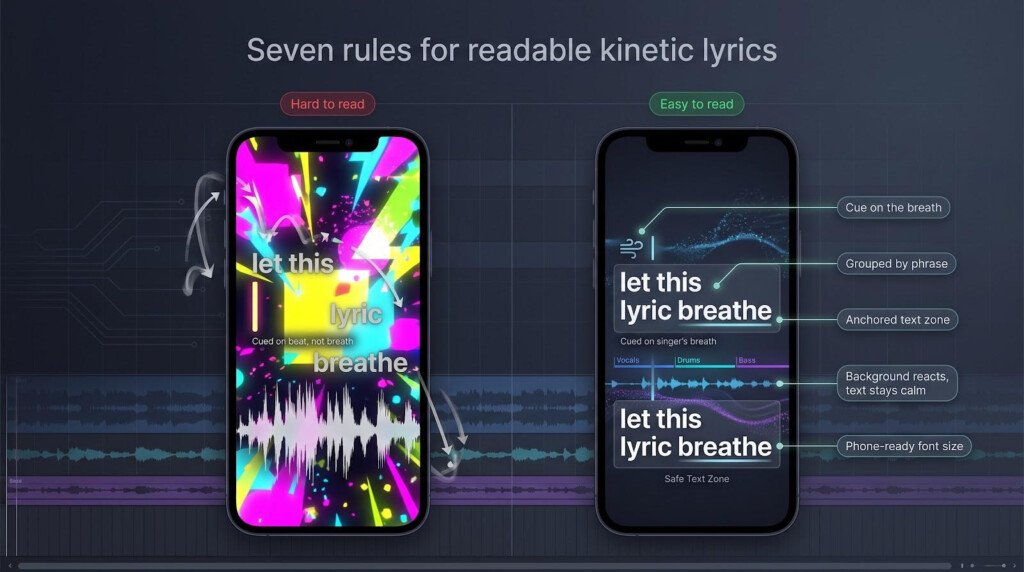
- Cue on the breath. Trigger each line at the singer’s inhale, not the bar line your DAW draws, so the reader gains a split second to comprehend.
- Vary motion intensity. Reserve big moves for hooks or title lines and let verses glide, so the chorus still feels like an event.
- Group by phrase. Break lines where the meaning pauses, not where the character count evens out. The eye follows sense, not margins.
- Anchor placement. Keep text in one consistent zone. If it must move, shift once per section and for a reason.
- Mirror the lyric’s verb. Let “fall” drop and “rise” climb. Literal motion lowers cognitive load and helps the words stick.
- Split foreground and background roles. Route drums to background flashes or camera shakes while vocals control opacity or highlight sweeps, so motion and text stop fighting for the same pixel.
- Test like a viewer. Play it at full speed on a phone with the sound off. If every line is readable there, the desktop experience will be effortless.
How to Choose for Your Release
Each song serves a mission, so pick the tool that fits the brief rather than the longest feature sheet.
- Fast social teaser. Need a clip within the hour? Sonexa: import, pick a preset, export vertical, post.
- Official full-length YouTube lyric video. Story-heavy tracks deserve stem-aware motion. Neural Frames keeps the vocal clear while the camera moves with the music.
- EDM or instrumental-heavy track. When the drop is the star, TwoShot lets drums or bass drive visuals while lyrics stay frozen on sparse vocal phrases.
- Singer-songwriter narrative. Clarity beats spectacle. Youka’s minimal sweep keeps words front and centre.
- Rap or bilingual verse. Precision matters. TwoShot’s phoneme stamps let you correct individual syllables.
- Budget-tight single with visual demands. Videobolt delivers polished templates on a flat subscription; accept the motion compromises and spend the saved budget on promotion.
What These Tools Actually Cost
Free Tier, Free Trial and Free Preview Are Not the Same Thing
“Free” wears several disguises. TwoShot runs a genuine free tier with a monthly credit allowance and no watermark on any plan. Solmi also offers a free plan with a credit cap. Neural Frames does not have a free tier at all — every plan is paid. Before you sink hours into editing, confirm that a watermark-free export exists on the tier you are actually using and that the included allowance covers your song length.
Cost After Revisions, Not the Headline Price
Budget for the second render. Neural Frames meters credits by rendered second, so a re-render costs again even if you only changed a font weight. Lock your timing first: drop a static background, confirm every syllable lands, then add the effects. That single habit cuts the credit burn substantially.
Check Whether 4K Sits on the Plan You Need
Resolution is the classic upsell. Neural Frames puts 4K upscaling on Ninja while Knight stops at 1080p. Videobolt includes up to 4K at 60fps on its Pro tier. TwoShot offers native 4K. Solmi caps at 1080p and Sonexa at 1440p, whatever you pay. If your main music video is 4K and you plan to intercut lyric sections, decide before you edit rather than after.
Treat “Unlimited” as a Question
Where a platform advertises unlimited anything, read what it is measuring. Videobolt’s Pro tier covers unlimited watermark-free renders, but caps runtime at an hour per video. Credit-based tools meter render length rather than file count, so a long song costs more than a short one at the same “unlimited” price. Check which unit is actually uncapped before you plan an album rollout.
Rights, Labels and Unreleased Audio
Upload Only What You Have Permission to Use
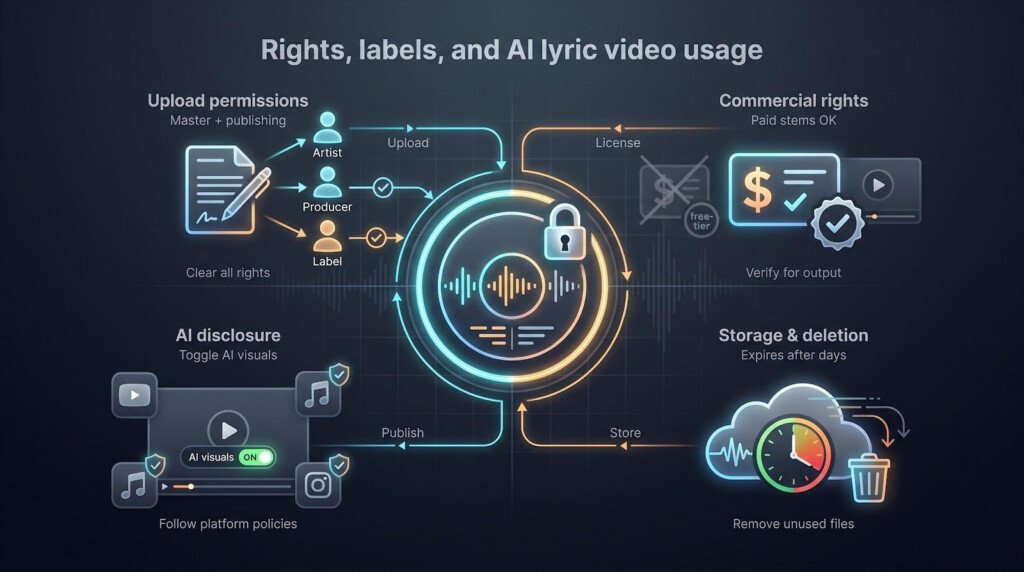
Every generator here assumes you control both the master and the publishing rights to what you upload. If a collaborator owns the hook or a producer still holds the beat, clear it first, and do the same for any artwork in the background. A sync dispute can pull a video down long after it has gained views.
Confirm Commercial Rights to the Output
Most platforms grant commercial use of the finished render, but that licence only extends as far as the underlying audio. Read the terms before you license a video onward or use it in paid promotion, and keep your licence emails where a distributor can see them.
Know How Long Your Audio Stays Online
Stem analysis puts your song on a server during rendering, and it may stay there afterwards. Retention windows vary widely and usually live in the privacy policy rather than the pricing page, so find the figure for your platform before uploading anything under embargo — then download the export and delete the project.
Disclose AI Usage Where Policy Demands It
YouTube asks creators to label content that is meaningfully AI-generated or AI-altered, and its 15 July 2025 update renamed the repetitious content rule to inauthentic content, targeting channels that mass-produce near-identical videos. Enable the disclosure where visuals could be mistaken for real footage, and keep each release visibly distinct.
Frequently Asked Questions
What is the best AI lyric video maker for kinetic typography?
Neural Frames. Its eight-stem engine lets visuals follow drums or bass while the lyric stays tied to the vocal, which is the only reliable way to move the screen without burying the words. TwoShot is the closest alternative and costs less; Videobolt is faster if you want a template.
How do I keep kinetic typography readable?
Freeze the lyric layer to the vocal, route background motion to drums or bass, trim entrance animations to under half a beat, and test the video on a phone with the sound off.
Is word-level or line-level timing better?
Line level suits slow ballads and keeps the frame clean. Word level matters for rap, bilingual verses, or any section where syllables arrive faster than the eye can scan a full line.
Can I upload my own MP3 or WAV?
Yes. All six tools accept direct audio upload, and Youka also accepts YouTube links.
Does Neural Frames generate music?
No. It builds video from audio you supply. Composition happens elsewhere.
Can I use a track made with Suno or Udio?
Yes. Neither platform builds the music video for you, so a track from either still needs visuals made somewhere else. Check the commercial terms attached to your export before publishing.
Can AI handle fast rap or multilingual lyrics?
Usually. TwoShot’s phoneme-level stamps handle double-time flows and Youka detects more than 50 languages. Paste a clean lyric sheet and review the tricky spots.
Do I still need After Effects?
For bespoke text choreography, yes. For quick social clips these tools save hours. Treat After Effects as the boutique and the AI apps as print on demand.
The Verdict
Neural Frames takes it because it lets typography hear what musicians hear — every stem, every transient, every gap that gives a word room to breathe. Its price and learning curve are real costs, and TwoShot delivers much of the same discipline for less, but nothing else on this list gives you eight separate parts of the mix to move the picture with.
The further down the ranking you go, the less the motion layer knows. TwoShot respects stems but asks you to steer. Videobolt and Solmi trade insight for speed. Youka and Sonexa each do one job quickly without listening deeply.
Match the tool to your timeline and your tolerance for compromise, and keep the lyric readable. The audience came to hear the words. Make sure they can see them.
#This is a Contributor Post. Opinions expressed here are opinions of the Contributor. Illustrate Magazine does not endorse or review brands mentioned; does not and cannot investigate relationships with brands, products, and people mentioned and is up to the Contributor to disclose. Contributors, amongst other accounts and articles may be professional fee-based.#